 Minium
Guide
Update an EPUB without losing your place
For serials, fanfiction and books still being written. Bring in the newer file, and Minium can keep your place, your quotes and the rest of your reading history.
The problem
A book that’s still being written gets new chapters. You download the updated file, and most readers treat it as a new book: you start again from the beginning, and your highlights stay behind with the old copy.
Minium can tell it’s the same book, and carry your reading over to the new file.
Step by step
- Download the updated file. Get the newer EPUB from wherever you read the story, the same way you got the first one. Minium doesn’t download chapters for you.
- Add it to Minium. On the Library tab, tap + (Add books) and pick the file in Files or iCloud Drive, or share it to Minium from another app. Leave the older copy on your shelf.
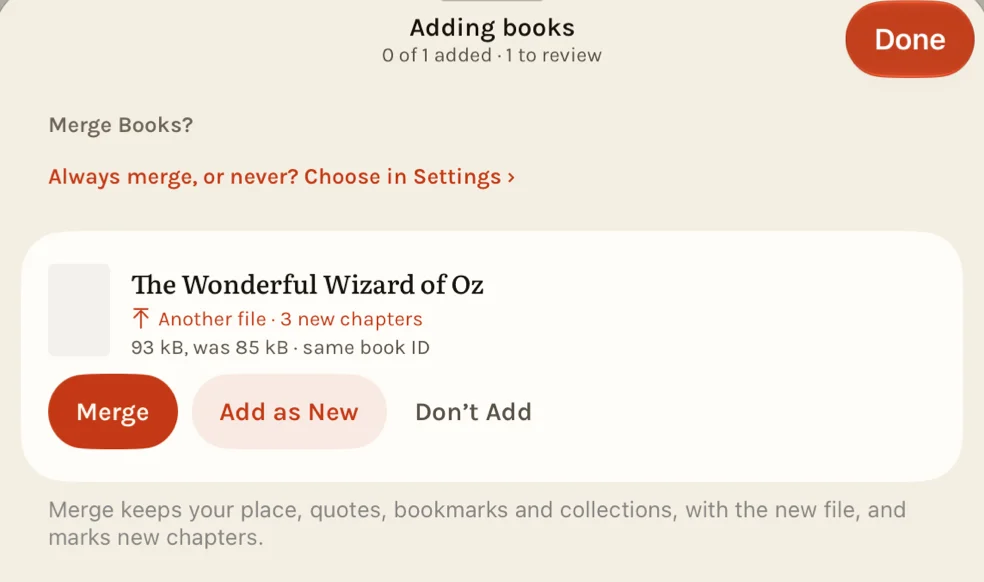
- Choose Merge. If Minium recognizes the book, Adding books asks Merge Books? Merge moves your place, quotes, bookmarks and collections to the new file. Add as New keeps both as separate books, and Don’t Add leaves your shelf as it was.
- Open the book. If you had read up to where the new chapters begin, Minium opens on the first of them, and Back to where I was takes you to your place. Otherwise your place stays, and a notice says which chapters are new, such as “New chapters 21–23 added”.
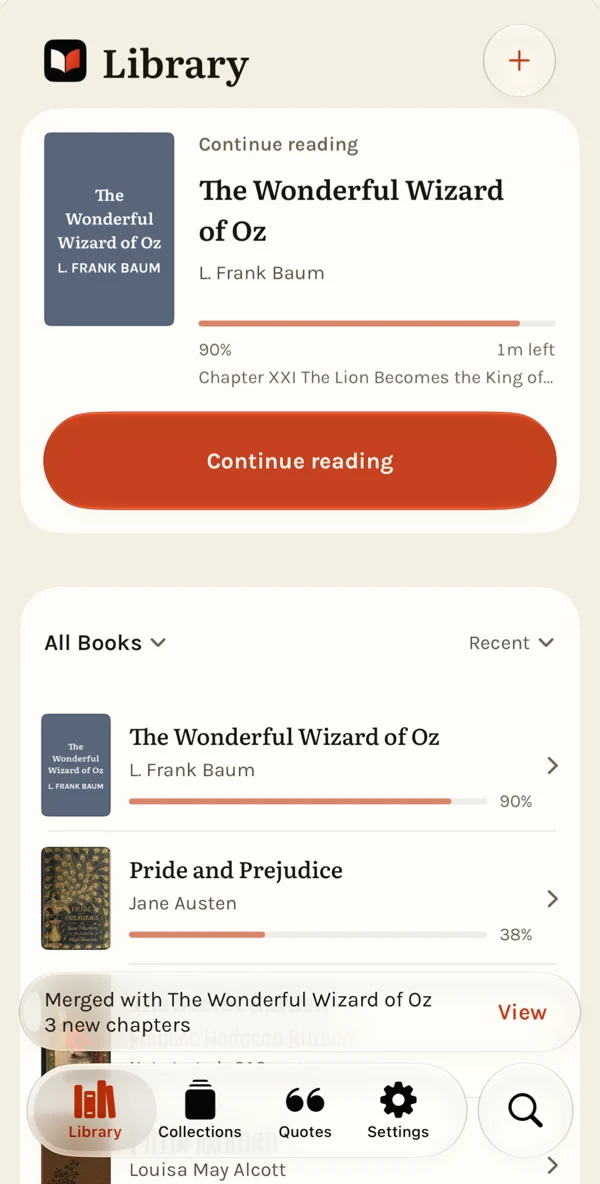
After Merge 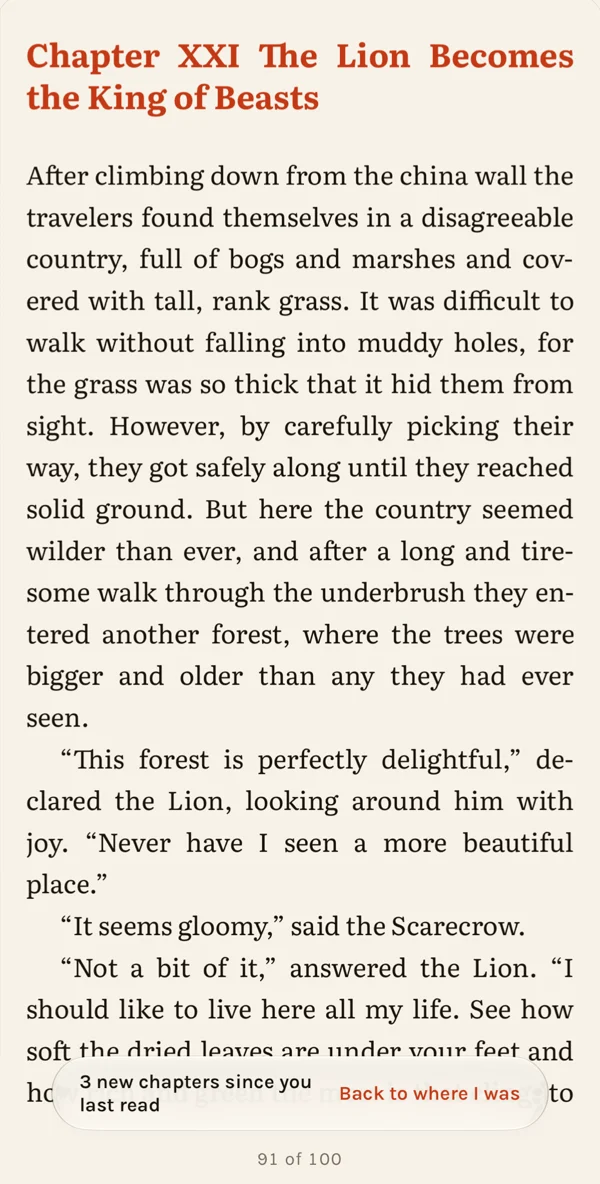
On the first new chapter
Always merge, or never ask? In Settings, then Books You Add Again, Already on your shelf sets it: Ask, the default, asks each time; Merge merges every match without asking; Add as new keeps every file as another book. Keep Ask if you want to review each one, since a merge can’t be undone. Go to new chapters, on by default, chooses whether the book opens on them.
Removed it already?
Add the new file anyway. With Restore removed books on (Settings, then Books You Add Again; it’s on by default), a removed book Minium recognizes comes back with its place, quotes, bookmarks and collections, and its new chapters are found the same way. If you’d rather start over, Start fresh undoes it.
How Minium recognizes a book
Minium can recognize the newer file. It doesn’t always, and this is how it decides:
- The same file is always the same book.
- A stable ID (an ISBN, a DOI or a publisher’s web address) decides when both files carry one: they match when the IDs and the titles agree. Two different ISBNs are two editions, whatever their titles say.
- Otherwise, the title and author. With Match by title and author on (Settings, then Books You Add Again; on by default), the title and first author must agree, and so must the language when both files give one. A translation is another book, and a book with no author doesn’t match this way.
Throwaway IDs that converters stamp on each copy never decide either way.
What it can’t do
- Fetch chapters. Minium doesn’t download new chapters or check for them. You bring the updated file.
- Match every file. A match depends on the book’s details: its ID, title, author and language. A file whose details changed comes in as a new book.
- Join different works. It’s for the same work. Another edition with a new ISBN, or a translation, is another book.
- Keep every quote on its passage. Quotes are found again in the new file by their own words. A quote whose passage is gone is kept, and opens at its chapter.
- Undo a merge. Once merged, the older file is replaced. If you’re unsure, Don’t Add leaves the copy on your shelf as it is.
Tips for the file
- Export the story the same way each time, from AO3, Royal Road, Calibre or wherever it comes from, so the title, author and language stay the same from one download to the next.
- If the book has an ISBN or another ID, keep it. When you edit a book in Calibre, leave its identifiers as they are.
- Choose EPUB or FB2 when the site offers a choice.
Questions
- Which formats can I update?
- Minium reads EPUB, FB2, PDF, CBZ comics and Kindle books without DRM (MOBI and AZW3). Add them one at a time, or several at once from Files, ZIP archives included. A PDF merges only with a PDF, and a comic only with a comic: neither merges with an EPUB, FB2 or Kindle book.
- What happens to my bookmarks and collections?
- Merge keeps them, with your place and your quotes, and so does a removed book that comes back. Add as New starts the new copy fresh, and the older copy keeps its own.
- Does it work offline?
- Yes. Everything happens on your device. Minium has no account and no server, and your books never leave the device.
- Is there anything to set up?
- No. The settings above are on by default, and Minium asks before it merges.


More help is on the support page.